In my recent article
Product Managers: Chief ***holes or Value Creators?, I stated:
For both proprietary and commercial open source software, the Product Manager needs to focus on
creating a product that people will actually buy! And to do that, the Product Manager needs to listen to the market in order to
understand their Buyers and Users.
So how can a Product Manager (or any business owner for that matter) be as efficient and effective as possible listening to the market? And how can they easily share the information they gather with other stakeholders interested in learning and understanding?
Below is a list of FREE tools/websites/tips I currently use for
Listening and Sharing as part of my daily routine. Please note that
RSS Feeds are at the heart of my system. If you are new to RSS, please read:
Google Reader Help Center: What is a feed? What does it mean to subscribe? Also note that these tools do not replace but add information (in an automated, scalable manner) that complements my usual face to face/phone/email conversations with customers, prospects, partners, coworkers, etc.
1. Key Websites: Start off by creating a list of the best sources of online information (news, articles, opinions, blogs, online communities, industry analyst sites) for your product's industry, buyers, users, key influencers, etc. If you are drawing a complete blank, start with
Alltop, which attempts to collect "all the top" stories across the web. Be sure to ask others (including some of your customers) what sites they read. Try to make a NICE BIG LIST and always keep your eyes and ears open for new sites to add to your list. You can always trim the noise and useless sources of information later. Be sure to include any public forums or online communities (ex. Facebook Groups) that are engaging in discussions related to your areas of interest.
2. Google Reader: Subscribe to as many of your Key Websites as possible using an RSS Feed Reader. I use
Google Reader which is free and easy. Any good reader will do. If you don't already use an RSS Reader (ex. you subscribe to email alerts instead), then
I strongly suggest you move this task out of Email and use RSS Feeds instead! Why? Because email is an inflexible closed system that is already likely overloaded; whereas RSS Feeds are designed to enable you to more easily GATHER, ORGANIZE and SHARE articles that you find useful with others.
More details below on how I use Google Reader.
3. Google News and Blog Search: Your list of Key Websites is not enough. You need to identify the key terms for your area of focus and setup RSS Feeds from
Google News and
Google Blog Search (and any other useful search sites; such as
Technorati) for the various search criteria that you want to track. You will likely setup multiple feeds across your search criteria (ex. your product, your competitors products, key industry terms, etc.). This is not an exact science, so it's OK to tweak your terms and recreate your feeds until you get a good flow of information going!
4. Delicious Social Bookmarking: While you can use the organization and favoriting features built into Google Reader, I prefer to use
Delicious to
store and organize my bookmarks.
Click here to learn about Delicious and Social Bookmarking. The Delicious Toolbar Buttons (Bookmarklets) make the process of creating bookmarks easy. I use tags to help me organize my bookmarks. For example, look at my
Ringside Networks Delicious page to see my favorite articles, and click on the "Recommended" tag to see how it displays only those articles tagged as "Recommended". If you don't like Delicious,
Magnolia is another social bookmarking site worth considering.
More details below on how I use Delicious.
5. Small and Shareable Links: Sometimes you want to share a link to an article that has a really long URL. I use
TinyURL for turning long URLs into teeny-tiny URLs. So,
http://www.pragmaticmarketing.com/blogs/productmarketing becomes
http://tinyurl.com/2vzwqp. Be sure to setup the
TinyURL Toolbar Button which makes creating a TinyURL just one click away. NOTE: I use TinyURL when I need a short URL and don't mind obfuscating (hiding) the original URL. I tend NOT to use TinyURL when I want/need to use the real links (ex. when referring to pages on my company website, I want to keep track of other sites that link to pages on my website).
6. Social Media Firehose: The
Social Media Firehose leverages Yahoo Pipes to tap into what people are saying and sharing across the realm of Social Media (ex. Flickr, Twitter, Friendfeed, Digg, etc.). It's as simple as plugging in your search terms, any sites you want excluded from the search, and clicking Run Pipe. After the search runs, simply add it as a feed to your reader in order to track the conversations happening on the
Social Web. For those interested in just searching Twitter conversations,
Summize (now Twitter Search) is a good tool for doing just that.
7. Forums and Online Communities: If your company offers a User Forum or if you are aware of any independent forums focused on your area of interest, then you may want to subscribe to a feed focused on the the topic areas you are interested in. For example, the Ringside Networks forums are at
http://forums.ringsidenetworks.org/ and I tune into the User Forums rather than the Developer Forums. When I was at JBoss, I also subscribed to the User Forums.
8. Social Following and Aggregation: If you have a handful of key people whose commentary you like to follow closely AND who use
Friendfeed to aggregate their blogs, twitters, and other social activities, then you should create an account on Friendfeed and follow them. You can also subscribe to your Friendfeed feed within your reader, if you want.
9. Website and Content Analytics:
Inbound Marketing (where you help yourself "get found" by people learning about and shopping in your industry) is an important process for small to midsize companies to understand. Since CONTENT is the fuel for the Inbound Marketing machine, it is critical for Product Managers and Product Marketers to understand who's viewing the content on their website, how they are finding the content, how often they are viewing, etc. Why? Because if you're going to spend time creating content, you should use tools to measure how successful / useful that content actually is. At JBoss, we used Eloqua and SalesForce.com as key components of our "marketing machine". We're a much smaller company at Ringside Networks, so I use
Google Analytics to analyze website traffic, and I've been considering
HubSpot to help me get fancier with improved search engine optimization, etc. HubSpot also offers two FREE tools worth mentioning:
Website Grader and
Press Release Grader. Both provide a nice summary of what's working and what can be improved. Finally,
SEO Pro's Link Checker is a useful free tool that analyzes who is linking to your pages. Just plug in your link and after a little while it will list all of the places that link is referenced.
10. Private Wiki / Intranet: For the files and information that can not be stored publicly, leverage your corporate intranet or create a protected section off of your wiki. My main point here is for you to MOVE THE FILES AND INFORMATION THAT EXIST ONLY ON YOUR LAPTOP INTO AN ACCESSIBLE PLACE! Why? Because people get hit by busses. People leave companies. Other people could benefit from information you have...if it wasn't locked up on your laptop. Yes, you will need to keep some information private and on your laptop. For all of the other useful information, give it wings and make it free! At JBoss and Red Hat, I stored most of my useful yet private information on our Private Wiki (behind our firewall). NOTE: You can still leverage Social Bookmarking for links to files that are on your Intranet. Just remember that only fellow employees who have access will be able to view the documents; all others will get an error accessing the link.
So that's my list of tools and websites use for listening and sharing. Since Google Reader and Delicious are tools that I use day in and day out, let me go into a little more detail on how I use these important tools.
How do I use Google Reader?Let's start with a screenshot of my Google Reader at this very moment:
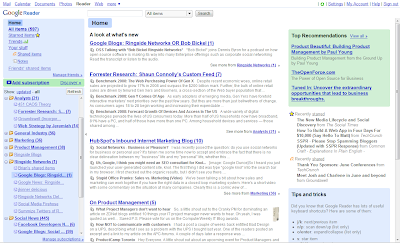
On the left, you will see that I have my Feeds organized into Folders (ex. Analysts, Product Management, Marketing, Ringside Networks, etc., etc.). This helps me organize the flow of information and enables me to keep on top of the more important folders (ex. keep their unread counts near zero).
So while I'm drinking my morning coffee, I read through they key areas and do a quick triage on the other folders to see if anything else is worth spending time on. If I want to flag an article for followup, I click on the Star in Google Reader, which adds it into the Starred Items list. I use this list as a lightweight way to keep track of links that I'd like to chew on for a while (ex. articles I may refer to in one of my future blog posts).
UPDATED: In response to requests for a "how-to" video, I posted
"Google Reader In Action" which shows how to get started with Google Reader in less than 5 minutes. The video walks you through subscribing to search results on Google News, Google Blogs, and the Social Media Firehose.
How do I use Delicious?Whenever I come across a web page or article worth bookmarking and sharing, I use the Delicious Toolbar Buttons to save a link to the article. I usually specify a one or two sentence description as well as one or or more tags.
More interestingly, I use Delicious to
automagically populate the Recommended Reading section of the
Ringside Networks Social Business web page.
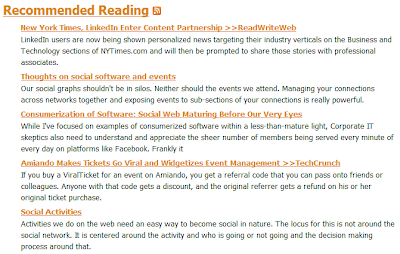
How does this work? I leverage the
Delicious Linkrolls feature to show just the articles with the the Delicious
"Recommended" tag within a specially formatted list. I also use this feature to keep track of notable mentions of Ringside Networks by the media. See the Ringside Networks Media Coverage section of the
Ringside News page as well as the Delicious
"RingsideBuzz" tag to see how this works.
What About Online Talking?The list above is focused on online Listening and Sharing. I intentionally did not cover tools for online Talking (ex. Blogs, Wikis, Forums, IRC, Facebook, Twitter, etc.) since I believe people should get good at Listening and Sharing before making the leap to Talking. If you just can't wait to get started Talking, then I suggest you create a blog and post to it on at least a weekly basis. Also post comments in response to other people's blogs and articles, as well as answer questions on Forums.
UPDATED: For a good overview of why you should blog and how to go about it, read Gopal Shenoy's "
Five reasons why I blog and my eight blogging recommendations".
How Are You Listening and Sharing?Are you using any of the tools I mentioned above? If so, how are they working out for you? If not, what are you using? I'm always looking for tools that help me work smarter, so if you have any goodies, please share.
ReferencesFor your convenience, here is a list of the various tools and websites that I mentioned above: